


EW-XBS10000
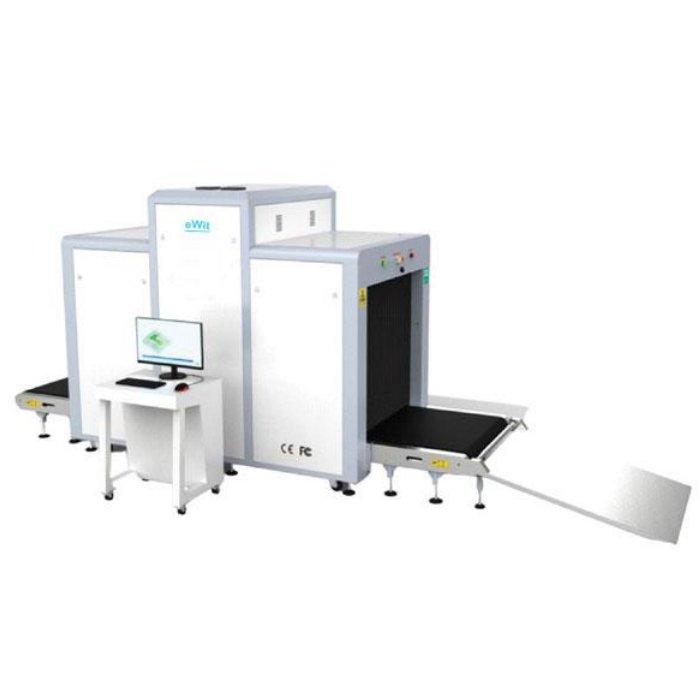
X-Ray Baggage Scanner
EW-XBS10000 X-ray Baggage scanner is ideal for screening everything from mid-size packages to oddly shaped items and palletized loads. It is strategically designed for mid-size baggage and parcels to thwart the cleverest attempts at hiding weapons, drugs, stolen goods, and other contraband. Dual-energy imaging provides automatic color coding of materials.
Key Features
- Linux Operating System.
- Built-in Self-Check & Diagnosis.
- Continuous 10000 working hours.
- High-resolution color display.
- Scan Palletized loads.
- Sound & Light Alarm.
Description
Specification
| Specification | Details |
|---|---|
| General Specification | |
| Tunnel Size | 1011*1006.5mm (width*height) (±20mm) |
| Product Size | 4835*1295*1916.5mm (L×W×H) |
| Wire Resolution | TypicalAWG36 |
| Penetration Resolution | TypicalAWG24 |
| Spatial Resolution | Vertical:1.6mm, Horizontal:1.6mm |
| Steel Penetration | Typical 34mm (±2mm) |
| Resolution of Organic Matter | 1-120mm |
| Gray Scale & Mixture Resolution | 1-40mm |
| Resolution of Inorganic Objects | 0.2-10mm |
| X-Ray Dosage Each Inspection | ≤2.5µSv (uGy) |
| Boundary Leakage | ≤0.5µSv /h(uGy/h) |
| S/N Ratio | <60dB |
| Conveyor Speed | 0.2m/s |
| Conveyor Max Load | 200kg |
| Power Consumption | 1.0KW |
| Leakage Current | ≤5.0mA |
| Film Safety | Guarantee /ISO 1600 Film |
| Weight | 940kg |
| Operation Temperature/Humidity | 5°C-40°C/0%-90% |
| Storage Temperature/Humidity | -20°C-60°C /10%-90% |
| Atmospheric Pressure | 86kPa-106kPa AC |
| Operation Power | 220V(±10%-15%) 50±3Hz |
| Operation System | Linux |
| Configuration | |
| X-Ray Generator | 160 K V, oil cooling, from top to bottom |
| Operating | Linux, operating 1G, storage 8G |
| Monitor | 19″ LED screen, resolution: 1920*1080pixels |
| Operation Console | Double screen console |
| Software Functions | |
| Power-On Self-Test | With the function of fault self-check, automatically judge the fault and prompt the fault code information in time. |
| Image Processing | With the function of Color/ B W, negative, high/low penetration, organic /inorganic stripping, general enhancement, pseudocolor, etc. |
| Image Recall | 30 preceding images are recallable. |
| Images Stored | Up to 10,000 images automatic storage. |
| Real-Time Curve | The real-time curve can be used to detect whether the acquisition system and components work normally. |
| Time Setting | System time can be set manually. |
| Probe Setting | It can realize the manual deletion of the low and low energy detection board dead pixels, and display the deleted dead pixels in the display area. |
| Ray Source Setting | There are two source and analog source control modes, the source parameters of the digital source can be set. |
| Alarm System | The alarm function can be activated and deactivated, the alarm type of the alarm box sound and light alarm can be selected, and the sensitivity, minimum absorption rate, the maximum absorption rate, and alarm duration can be set. |
| Trouble Shooting | It can realize whether the components such as the entrance and exit light barrier, side panel switch, emergency stop switch, and light source are normal, and display the standard value and the current value of the detection voltage. |
| Image setting | Drum running control direction and the image display moving direction can be set. |
| Software registration | Realize software registration functions and has a serial number, registration code, registration status and system time information display. |
| User login | Add, delete, edit the user name and password, and set the user level to restore the deleted user. |
| Language | English. |
| About | Version and device number can be displayed. |
| TIP report | Reports can be generated by the tip operation after the tip insertion function is turned on, and the content of the report: user name, number of tip insertions, number of tags, false-positive rate, probability of detection, probability of false positives. |
| TIP Management | Function to enable and disable the insertion of dangerous goods and can set the identification time, prompt time, insertion frequency, proportion of single items inserted into dangerous goods, add tip files and delete files. |
| Document management | Query, open, and export the checked image. |
| Function Setting | Set log level, save the file time, whether to open the training function and setting the smart roller. |
| Data Setting | Display system working hours, total working hours of the ray source, total number of system baggage and packages, and the total number of baggage packages this time, and clear the above data. |
| System parameter setting | It can select the exported data, pictures, and backup directory, select and adjust the motor type, detector type, whether to enable the debug mode, model, and gain, enter the corresponding IP address on the network connection to realize sharing function and have corresponding software to achieve system upgrade. |
Reviews (0)


Reviews
There are no reviews yet.